
MM logo white 1
MM logo red
Image description is not available

How to copy and paste on a MacBook?

Daan2 SEPTEMBER 2025
Person types on a laptop, wearing a black and white polka dot top. A gray pen holder and notebooks are in the background.

Copy and paste are 2 of the most common actions you’ll use on a MacBook, whether you’re sharing a URL, moving a photo, or editing a document. This guide explains how to copy and paste using shortcuts, trackpad gestures, or a mouse. We’ll also show you how to use Universal Clipboard, Apple’s tool for copying between devices.

Copy and paste on a MacBook

A person uses a laptop and graphic tablet on a white desk. A lamp, plants, and pens are nearby.

The fastest way to copy and paste is with keyboard shortcuts:

  • Command (⌘) + C to copy.
  • Command (⌘) + V to paste.
  1. Select the text or image.
  2. Press Command + C.
  3. Go to where you want to paste it, and press Command + V.

You can also use a mouse or trackpad:

  • Right-click the selection (or tap with two fingers on the trackpad).
  • Choose Copy.
  • Go to the destination, right-click again, and select Paste.

How to take screenshots on a MacBook
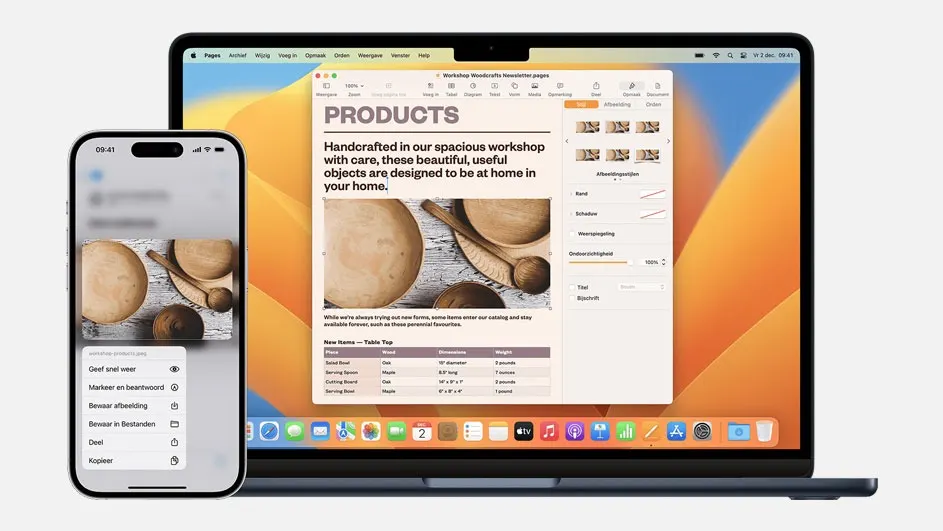
Copy and paste between Apple devices with Universal Clipboard

A laptop displays a document with product images, next to a smartphone showing a similar image with sharing options.
Bron: Apple website

Universal Clipboard lets you copy something on one Apple device (like your iPhone) and paste it on another, like your MacBook.

To use it:

  1. Make sure both devices have Wi-Fi, Bluetooth, and Handoff turned on.
  2. Sign in with the same Apple ID on both devices.
  3. Copy on one device.
  4. Paste on the other as you normally would.

Note: you won’t see a separate app or popup. Universal Clipboard runs in the background.

How to make the euro sign on a MacBook

What to do if Universal Clipboard doesn't work

Laptop and mouse on a wooden desk, with a coffee mug on a brown cloth and flowers in a vase against a gray wall.

If it’s not working:

  1. Make sure both devices are on the same Wi-Fi network.
  2. Check that Bluetooth and Handoff are enabled.
  3. Ensure both devices are signed in to the same Apple ID.
  4. Keep them within 10 metres of each other.

Also, your Mac must be running macOS Sierra or newer. Compatible models include:

Still having issues? Try restarting your MacBook using our tips.

Difference Between MacBook Air and MacBook Pro

Our advice on copy-pasting on Mac

Laptop displays a spreadsheet on a white wooden desk, with a hand using the trackpad and another holding a coffee mug.

Copy and paste is one of the easiest ways to speed up your work on a MacBook. With keyboard shortcuts, it only takes seconds. And with Universal Clipboard, you can seamlessly move text and images between your Mac, iPhone, and iPad if they’re nearby and correctly set up.

How to uninstall apps on a Mac

These articles may also be interesting for you